OpenVoiceOS Skills Server
Hivemind-core is the reference integration with OpenVoiceOS.
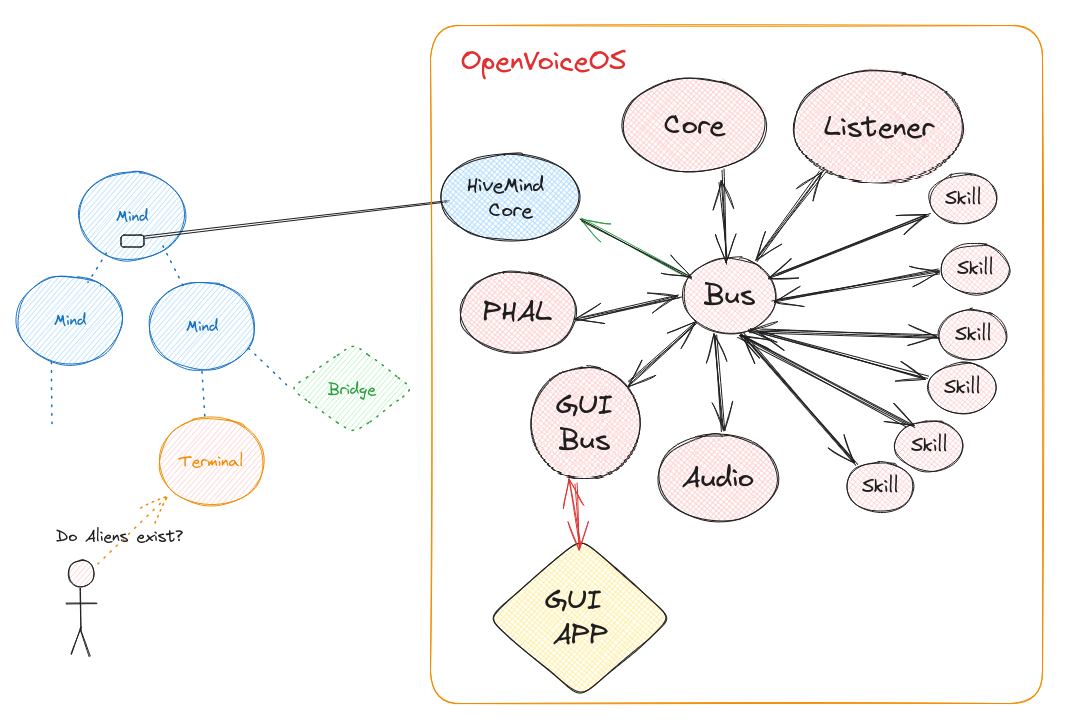
For a minimal install you only need
hivemind-core,ovos-core, andovos-messagebus.
Install
pip install hivemind-core
Usage
You manage everything through the hivemind-core command. See pairing for more information.
hivemind-core --help
Usage: hivemind-core [OPTIONS] COMMAND [ARGS]...

Options:
  --help  Show this message and exit.

Commands:
  add-client     add credentials for a client
  allow-msg      allow message types sent from a client
  delete-client  remove credentials for a client
  list-clients   list clients and credentials
  listen         start listening for HiveMind connections
hivemind-core listen --help
Usage: hivemind-core listen [OPTIONS]

  start listening for HiveMind connections

Options:
  --host TEXT       HiveMind host
  --port INTEGER    HiveMind port number
  --ssl BOOLEAN     use wss://
  --cert_dir TEXT   HiveMind SSL certificate directory
  --cert_name TEXT  HiveMind SSL certificate file name
  --db-backend [redis|json|sqlite]
                                  Select the database backend to use. Options:
                                  redis, sqlite, json.
  --db-name TEXT                  [json/sqlite] The name for the database
                                  file. ~/.cache/hivemind-core/{name}
  --db-folder TEXT                [json/sqlite] The subfolder where database
                                  files are stored. ~/.cache/{db_folder}}
  --redis-host TEXT               [redis] Host for Redis. Default is
                                  localhost.
  --redis-port INTEGER            [redis] Port for Redis. Default is 6379.
  --redis-password TEXT           [redis] Password for Redis. Default None
  --help            Show this message and exit.
Why HiveMind?
HiveMind gives OVOS a decentralized setup, with secure communication, device integration, and a documented protocol. Here is what it brings:
- HiveMind as an OVOS add-on: start with OVOS by installing ovos-core, or use a Mycroft device. Then run
hivemind-coreto enable HiveMind. This turns your OVOS node into the "brain" of a HiveMind hub. - Decentralizing OVOS-Core: with HiveMind, thin clients like the voice satellite can connect without running the full OVOS software. This allows multiple access points, such as microphones across a home, while the core stays in one central location.
- Encrypted communication: HiveMind supports SSL-encrypted communication, so you do not have to manage certificates by hand. It auto-generates self-signed certificates for encrypted connections between devices.
- MessageBus authentication and security: HiveMind requires authentication for the message bus, so only authorized clients connect. This protects privacy and stops unauthorized access, unlike a setup where the message bus is left open.
- Exposing OVOS to the web safely: HiveMind can expose your OVOS instance securely over the web. Using the Flask chatroom template, you can interact with OVOS remotely while keeping it private and secure.
- Protocol for integration: HiveMind lets you integrate with external platforms like Android, Mattermost, or Twitch. Whether you want OVOS to act as a chatbot or connect to another service, HiveMind provides the protocol.
Key features and setup
- Devices connecting: install the HiveMind CLI and register it with your OVOS node to connect devices across your network.
- Decentralization: use lightweight devices like a Raspberry Pi with HiveMind to extend OVOS across rooms.
- Encryption and authentication: transmit data over SSL, with built-in encryption and message authentication.
- Web exposure: use HiveMind's secure web interface to interact with OVOS remotely.
- Chat integrations: install bridges like HackChat or Mattermost to bring OVOS to chat platforms.
With these features, HiveMind turns OVOS into a decentralized, secure platform for a wide range of use cases and integrations.